
So here’s a little update on my schedule rebuild.
I hate pouring a bunch of mental energy into something only to give up on it, but I’ve hit a point where I’ve needed to take a step back, look at what I’ve been working on and ask myself: am I really going to be able to make this work, or is it going to end up causing even more problems for the game?
Sadly, I think the answer is that I’ve tried to do something that’s beyond my current abilities. I think the idea itself is good; having a system in place to schedule follow-up events in advance, and to reschedule various events if a more important one comes up… but the logic and coding required has slowed me to a crawl.
Here’s an image of my attempt to walk through the logic for doing it, and breaking it down into different functions. I’m not sure if it’ll be meaningful to anyone, but it at least illustrates my thought process on this.
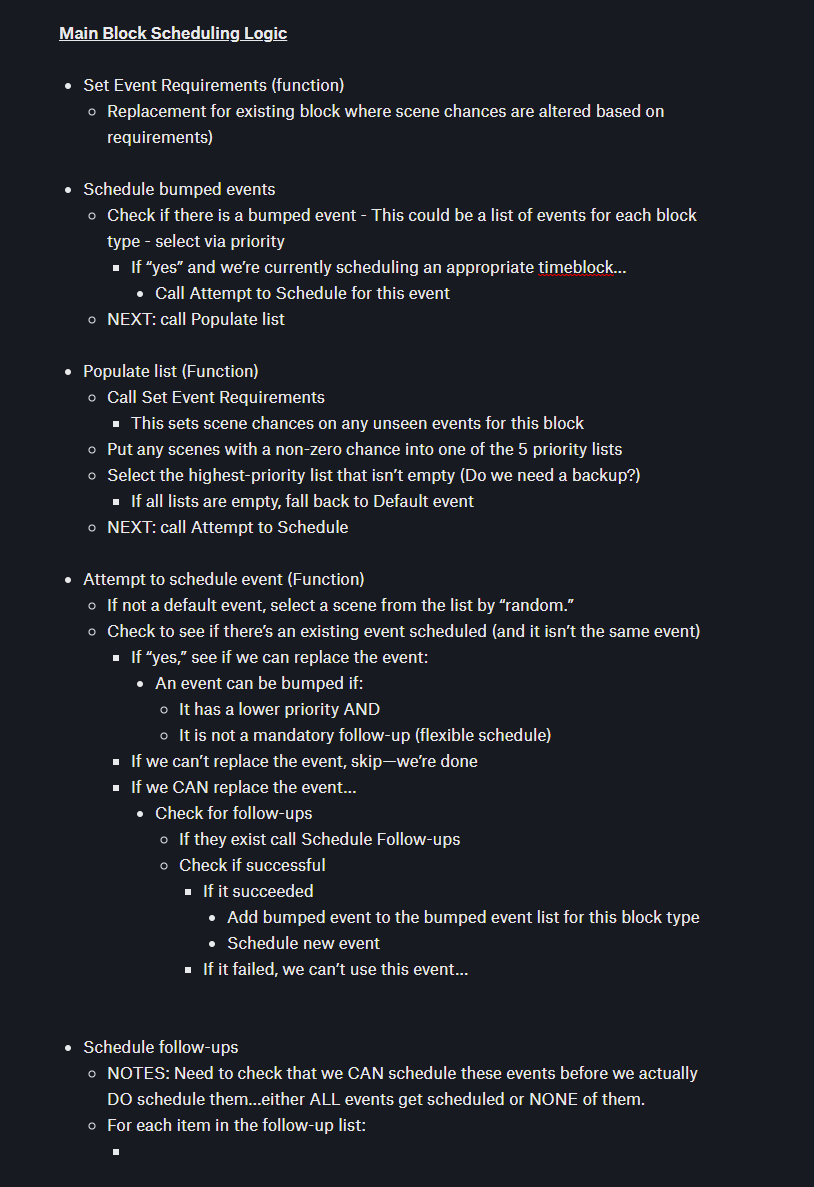
That said, I still want to have -some- kind of a schedule rebuild in place, even if it’s not nearly advanced as what I was shooting for.
In the course of making the game thus far, I’ve gone through many iterations of scene selectors/event pickers, and learned a lot from each iteration. Right now, most of those different methods exist in the game -simultaneously-, however, so the least I can do is attempt to build one refined version out of all of them and update everything to use the same (hopefully new) standard.
Currently in the game we have…
- The oldest way
Currently used for work events. It’s crude in that there are separate variables for whether or not the player has seen the event and what the weighting for how likely it is to come up in RNG. No matter how high the chances may be set for a scene, one with a very low chance can still be picked.
- Mini-work events
Only used in the small “chat” events that happen inside of the work periods, these aren’t much different than the previous method except that it’s the only instance of scenes having assigned priority levels (1 to 5).
- Free-time events
An update on the work events, these events were my first experiment with using Python classes. Each event is now an object which stores the “seen” and “chances” variables so they don’t need to be created manually. I’ve also added automation where the events can be added to lists and functions for adding/removing scenes from those lists.
So, my new plan is to try to see if I can update the free-time style of events to use priorities like the mini-work events.
That still doesn’t solve the problem with tracking time passage, but I’ll have to try to look into alternatives to what I was planning.
As I mentioned in a previous post, I have the event class object itself updated and have converted all of the work events over to using them, so that’s still helpful, at least.
DAY OUTLINE
Another product of my recent brain-wracking that may interest you is the update day outline I’ve been fleshing out as I’ve been planning the rework.
You can see how each major time block is broken up into a lot of smaller elements. It’s not complete, as I’m still trying to figure out nighttime—which has previously been glossed over, but existing events make it clear that nights and early mornings need a time block where events can be inserted without requiring the workarounds I’ve been using.
You can at least get an idea of how each day generally flows to some degree.

 Usagitriplesix
Leave a comment